
什么是响应式?
响应式是一种允许我们以声明式的方式去适应变化的编程范例。
这说明我们需要做到一下几点:
- 当一个值被读取时进行跟踪
- 当某个值改变时进行检测
- 重新运行代码来读取原始值
了解反应性
看看这个简单的应用程序:
<div id="app">
  <div>Price: ${{ product.price }}</div>
  <div>Total: ${{ product.price * product.quantity }}</div>
  <div>Taxes: ${{ totalPriceWithTax }}</div>
</div>
<script src="https://cdn.jsdelivr.net/npm/vue"></script>
<script>
  var vm = new Vue({
    el: '#app',
    data: {
      product: {
        price: 5.00,
        quantity: 2
      }
    },
    computed: {
      totalPriceWithTax() {
        return this.product.price * this.product.quantity * 1.03
      }
    }
  })
</script>
Vue 的 Reactivity 系统知道如果price发生变化,它应该做三件事:
- 更新
price我们网页上的值。 - 重新计算乘以 的表达式
price * quantity,并更新页面。 totalPriceWithTax再次调用该函数并更新页面。
但是等等,Vue 的 Reactivity 系统如何知道在price更改时更新什么,以及它如何跟踪所有内容?
这不是 JavaScript 编程通常的工作方式
运行此代码:
let product = { price: 5, quantity: 2 }
let total = product.price * product.quantity  // 10 right?
product.price = 20
console.log(`total is ${total}`)
你认为它会打印什么?由于我们没有使用 Vue,它将打印 10。
>> total is 10在 Vue 中,我们希望total随时更新price或quantity。我们想要:
>> total is 40不幸的是,JavaScript 是过程性的,而不是反应性的,所以这在现实生活中是行不通的。为了使total响应式,我们必须使用 JavaScript 使事情表现得不同。
问题
正如您在上面的代码中看到的,为了开始构建反应性,我们需要保存我们计算 的方式total,以便我们可以在price或quantity更改时重新运行它。
解决方案
首先,我们需要某种方式来告诉我们的应用程序,“存储我将要运行的代码(效果),我可能需要你在其他时间运行它。” 然后我们要运行代码,如果price或quantity变量得到更新,再次运行存储的代码。
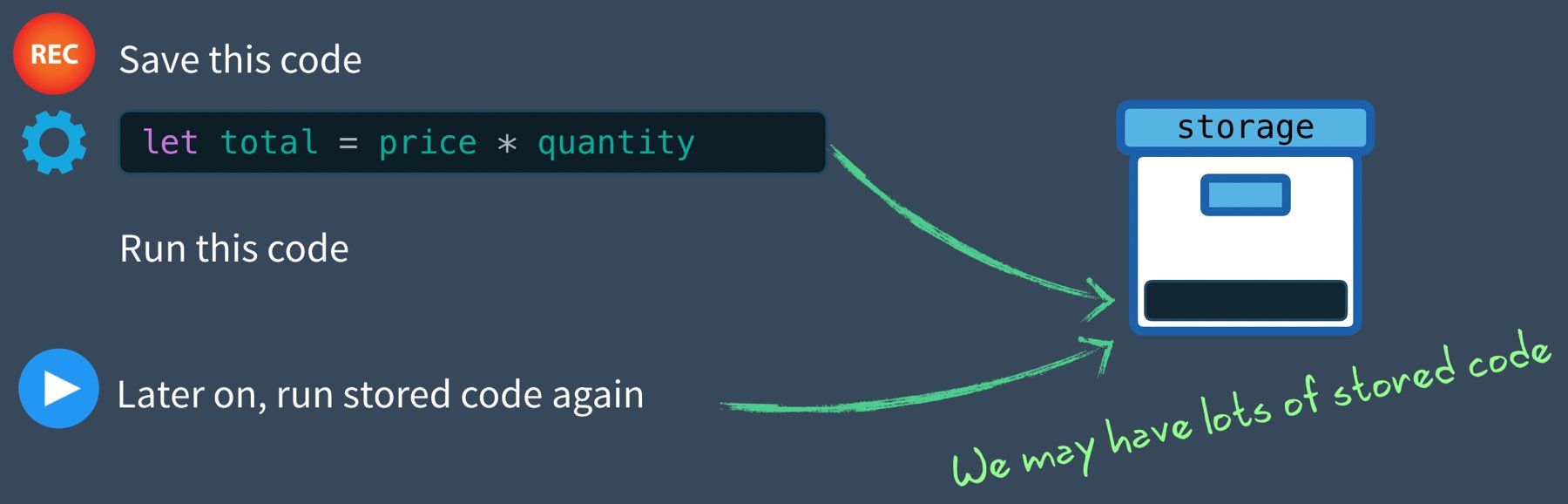
我们可以通过记录函数(效果)来做到这一点,以便我们可以再次运行它。
let product = { price: 5, quantity: 2 }
let total = 0

let effect = () => { total = product.price * product.quantity }

track() // Remember this in case we want to run it later
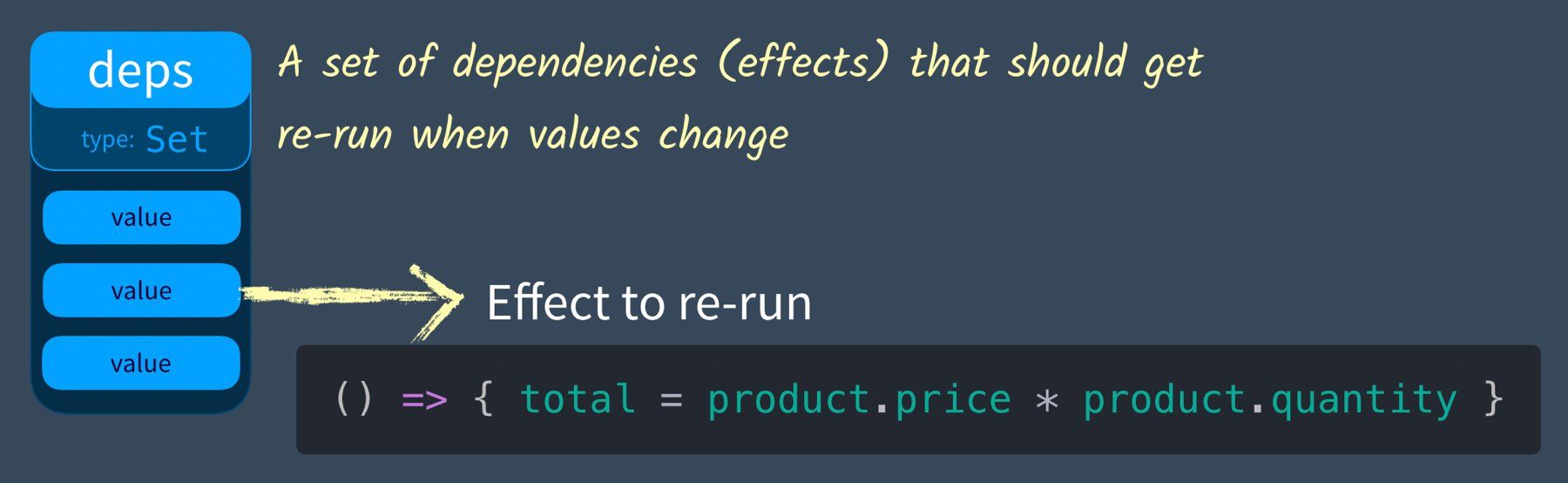
effect() // Also go ahead and run it为了定义track,我们需要一个地方来存储我们的效果,我们可能有很多。我们将创建一个名为 的变量dep,作为依赖项。我们称之为依赖是因为通常在观察者设计模式中,依赖有订阅者(在我们的例子中是效果),当对象改变状态时会得到通知。我们可能会像我们在本教程的 Vue 2 版本中所做的那样,使依赖成为一个具有订阅者数组的类。但是,由于它需要存储的只是一组效果,我们可以简单地创建一个Set。
let dep = new Set() // Our object tracking a list of effects然后我们的track 函数可以简单地将我们的效果添加到这个集合中:
function track () {
  dep.add(effect) // Store the current effect
}
JavaScript Array 和 Set 之间的区别在于 Set 不能有重复的值,并且它不像数组那样使用索引。
我们正在存储effect(在我们的例子中{ total = price * quantity }),以便我们稍后运行它。这是此 dep 集的可视化:
让我们编写一个触发器函数来运行我们记录的所有内容。
function trigger() {
  dep.forEach(effect => effect())
}这将遍历我们存储在dep中的所有匿名函数并执行它们中的每一个。然后在我们的代码中,我们可以:
product.price = 20
console.log(total) // => 10
trigger()
console.log(total) // => 40
这里是完整的代码。
let product = { price: 5, quantity: 2 }
let total = 0
let dep = new Set()

function track() {
  dep.add(effect)
}

function trigger() {
  dep.forEach(effect => effect())
}

let effect = () => {
  total = product.price * product.quantity
}

track()
effect()

product.price = 20
console.log(total) // => 10

trigger()
console.log(total) // => 40
问题:多个属性
我们可以根据需要继续跟踪效果,但是我们的反应式对象将具有不同的属性,并且这些属性每个都需要自己的dep(这是一组effects)。在这里查看我们的对象:
let product = { price: 5, quantity: 2 }我们的price财产需要它自己的 dep (set of effects),而我们quantity需要它自己的dep(set of effects)。让我们构建我们的解决方案来正确记录这些。
解决方案:depsMap
当我们调用 track 或 trigger 时,我们现在需要知道目标对象中的哪个属性(price或quantity)。为此,我们将创建一个depsMap类型为Map(想想键和值)的。 以下是我们如何可视化它:
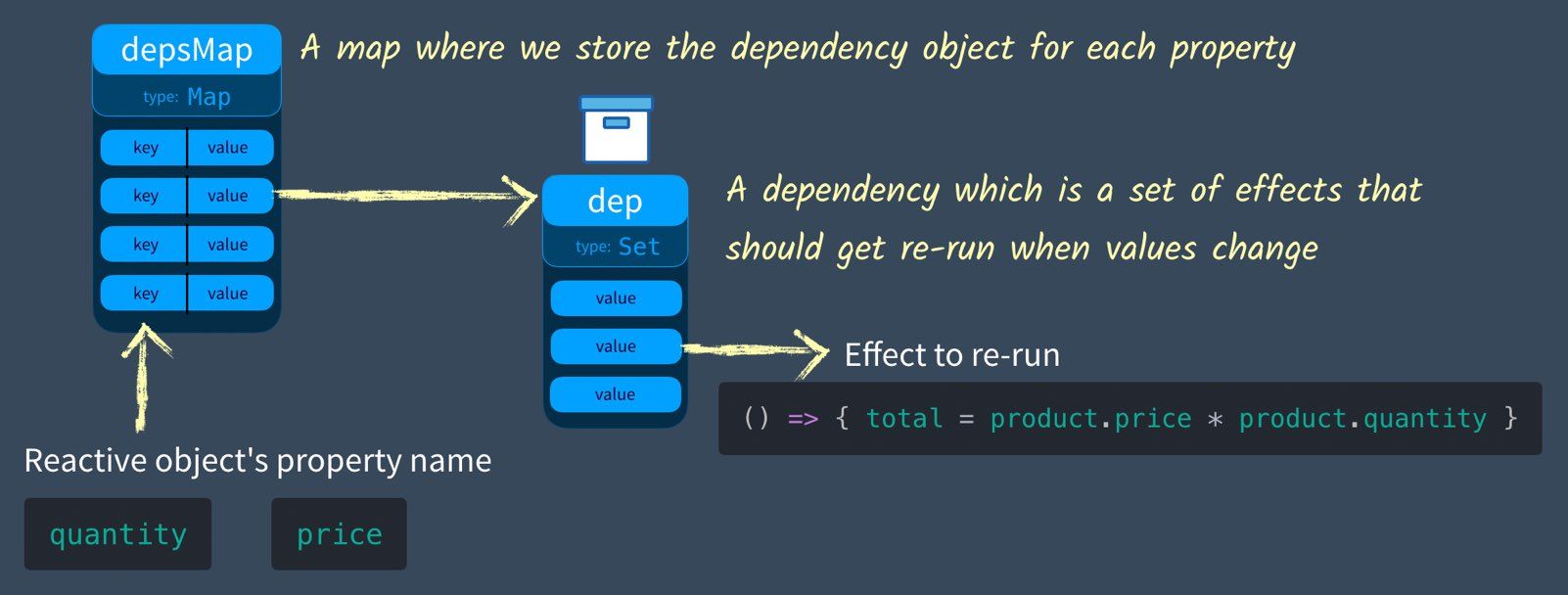
请注意如果depsMap有一个键,它将是我们要添加(或跟踪)新的属性名称effect。因此,我们需要将此键发送到该track函数。
const depsMap = new Map()
function track(key) {
  // Make sure this effect is being tracked.
  let dep = depsMap.get(key) // Get the current dep (effects) that need to be run when this key (property) is set
  if (!dep) {
    // There is no dep (effects) on this key yet
    depsMap.set(key, (dep = new Set())) // Create a new Set
  }
  dep.add(effect) // Add effect to dep
}
  }
function trigger(key) {
  let dep = depsMap.get(key) // Get the dep (effects) associated with this key
  if (dep) { // If they exist
    dep.forEach(effect => {
      // run them all
      effect()
    })
  }
}

let product = { price: 5, quantity: 2 }
let total = 0

let effect = () => {
  total = product.price * product.quantity
}

track('quantity')
effect()
console.log(total) // --> 10

product.quantity = 3
trigger('quantity')
console.log(total) // --> 15
问题:多个反应对象
这很有效,直到我们有多个需要跟踪效果的反应性对象(不仅仅是产品)。现在我们需要一种depsMap为每个对象(例如产品)存储 a 的方法。我们需要另一个 Map,每个对象一个,但关键是什么?如果我们使用WeakMap,我们实际上可以使用对象本身作为键。 **WeakMap**是一个 JavaScript Map,它只使用对象作为键。例如:
let product = { price: 5, quantity: 2 }
const targetMap = new WeakMap()
targetMap.set(product, "example code to test")
console.log(targetMap.get(product)) // ---> "example code to test"显然这不是我们要使用的代码,但我想向您展示我们如何通过targetMap使用我们的产品对象作为键。我们称我们的 WeakMap为targetMap是因为我们将考虑 target 我们正在瞄准的对象。
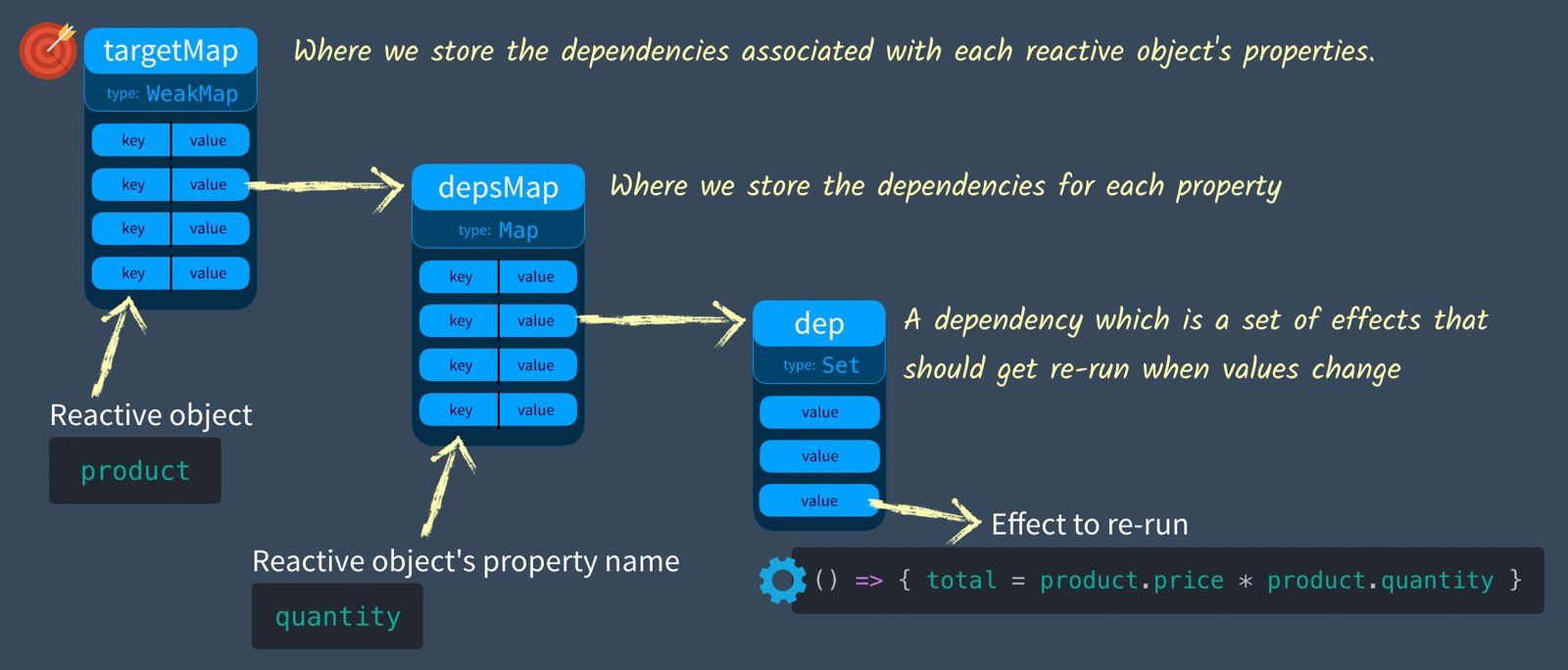
当我们调用track或trigger我们现在需要知道我们的目标是哪个对象。因此,target当我们调用它时,我们将同时发送 the和 key。
const targetMap = new WeakMap() // targetMap stores the effects that each object should re-run when it's updated

function track(target, key) {
  // We need to make sure this effect is being tracked.
  let depsMap = targetMap.get(target) // Get the current depsMap for this target

  if (!depsMap) {
    // There is no map.
    targetMap.set(target, (depsMap = new Map())) // Create one
  }

  let dep = depsMap.get(key) // Get the current dependencies (effects) that need to be run when this is set
  if (!dep) {
    // There is no dependencies (effects)
    depsMap.set(key, (dep = new Set())) // Create a new Set
  }

  dep.add(effect) // Add effect to dependency map
}

function trigger(target, key) {
  const depsMap = targetMap.get(target) // Does this object have any properties that have dependencies (effects)
  if (!depsMap) {
    return
  }

  let dep = depsMap.get(key) // If there are dependencies (effects) associated with this
  if (dep) {
    dep.forEach(effect => {
      // run them all
      effect()
    })
  }
}

let product = { price: 5, quantity: 2 }
let total = 0
let effect = () => {
  total = product.price * product.quantity
}

track(product, 'quantity')
effect()
console.log(total) // --> 10

product.quantity = 3
trigger(product, 'quantity')
console.log(total) // --> 15
拍拍自己的后背。战斗已经进行了一半。
但是,目前我们仍然需要手动调用track和trigger。我们将学习如何使用Reflect和Proxy自动调用它们。
解决方案:挂钩获取和设置
我们需要一种方法来挂钩(或侦听)我们的反应式对象上的 get 和 set 方法。
GET 属性 => 我们需要track当前effect
SET 属性 => 我们需要trigger此属性的任何跟踪依赖项(效果)
在Vue3中通过 ES6的Reflect和Proxy我们可以拦截获取和设置调用。以前在Vue 2中我们用 ES5 的Object.defineProperty做到了这一点。
理解 ES6 反射
要打印出一个对象属性,我可以这样做:
let product = { price: 5, quantity: 2 }
console.log('quantity is ' + product.quantity)
// or
console.log('quantity is ' + product['quantity'])
但是,我也可以使用 GET 对象的值Reflect。 Reflect允许您获取对象的属性。这只是我上面写的另一种方式:
console.log('quantity is ' + Reflect.get(product, 'quantity'))为什么使用reflect?好问题!因为它具有我们稍后需要的功能,所以请保持这种想法。
了解 ES6 Proxy
一个Proxy是另一个对象的占位符,默认情况下委托给该对象。因此,如果我运行以下代码:
let product = { price: 5, quantity: 2 }
let proxiedProduct = new Proxy(product, {})
console.log(proxiedProduct.quantity)该proxiedProduct委托给product它返回quantity的值2。请注意Proxy的第二个参数{}?这称为 handler,我们可以向它传递捕获器traps用于定义代理对象上的自定义行为,如拦截get和set调用。下面是我们如何在我们的handler上设置get捕获器:
let product = { price: 5, quantity: 2 }

let proxiedProduct = new Proxy(product, {
  get() {
    console.log('Get was called')
    return 'Not the value'
  }
})

console.log(proxiedProduct.quantity)
在控制台中,我会看到:
Get was called
Not the value
我们重新编写了get访问属性值时返回的内容。我们可能应该返回实际值,我们可以这样做:
let product = { price: 5, quantity: 2 }

let proxiedProduct = new Proxy(product, {
  get(target, key) {  // <--- The target (our object) and key (the property name)
    console.log('Get was called with key = ' + key)
    return target[key]
  }
})

console.log(proxiedProduct.quantity)请注意,该get函数有两个参数,target是我们的对象 ( product) 和key是我们试图获取的property,在本例中是quantity。现在我们看到:
Get was called with key =quantity
2
这也是我们可以使用 Reflect 并为其添加额外参数的地方。
let product = { price: 5, quantity: 2 }
let proxiedProduct = new Proxy(product, {
  get(target, key, receiver) {  // <--- notice the receiver
    console.log('Get was called with key = ' + key)
    return Reflect.get(target, key, receiver) // <----
  }
})
请注意,我们的 get 有一个额外的参数receiver,我们将其作为参数发送到Reflect.get. 这确保this当我们的对象从另一个对象继承值/函数时使用正确的值。这就是为什么我们总是在 Proxy内部使用Reflect,所以我们可以保留我们正在自定义的原始行为。
现在让我们添加一个 setter 方法,这里应该不会有什么大惊喜:
let product = { price: 5, quantity: 2 }

let proxiedProduct = new Proxy(product, {
  get(target, key, receiver) {
    console.log('Get was called with key = ' + key)
    return Reflect.get(target, key, receiver)
  }
  set(target, key, value, receiver) {
    console.log('Set was called with key = ' + key + ' and value = ' + value)
    return Reflect.set(target, key, value, receiver)
  }
})

proxiedProduct.quantity = 4
console.log(proxiedProduct.quantity)请注意,它set看起来与 get 非常相似,不同之处在于它使用Reflect.set接收value来设置target(产品)。我们预期的输出是:
Set was called with key = quantity and value = 4
Get was called with key = quantity
4
我们可以通过另一种方式封装这段代码,这就是您在Vue 3 源代码中看到的。首先,我们将这个代理代码包装在一个reactive 返回代理的函数中,如果您使用过 Vue 3 Composition API,它应该看起来很熟悉。然后我们将单独声明我们handler的traps并将它们发送到我们的代理中。
function reactive(target) {
  const handler = {
    get(target, key, receiver) {
      console.log('Get was called with key = ' + key)
      return Reflect.get(target, key, receiver)
    },
    set(target, key, value, receiver) {
      console.log('Set was called with key = ' + key + ' and value = ' + value)
      return Reflect.set(target, key, value, receiver)
    }
  }
  return new Proxy(target, handler)
}

let product = reactive({ price: 5, quantity: 2 }) // <-- Returns a proxy object
product.quantity = 4
console.log(product.quantity)
这将返回与上面相同的结果,但现在我们可以轻松创建多个反应对象。
结合代理+效果存储
如果我们使用创建反应式对象的代码,请记住:
GET 属性 => 我们需要track当前的效果
SET 属性 => 我们需要这个属性的trigger任何跟踪依赖项 ( effects)
我们可以开始想象我们需要调用的地方track和trigger上面的代码:
function reactive(target) {
  const handler = {
    get(target, key, receiver) {
      let result = Reflect.get(target, key, receiver)
        // Track
      return result
    },
    set(target, key, value, receiver) {
      let oldValue = target[key]
      let result = Reflect.set(target, key, value, receiver)
      if (result && oldValue != value) { // Only if the value changes
        // Trigger
      }
      return result
    }
  }
  return new Proxy(target, handler)
}
现在让我们把这两段代码放在一起:
const targetMap = new WeakMap() // targetMap stores the effects that each object should re-run when it's updated
function track(target, key) {
  // We need to make sure this effect is being tracked.
  let depsMap = targetMap.get(target) // Get the current depsMap for this target
  if (!depsMap) {
    // There is no map.
    targetMap.set(target, (depsMap = new Map())) // Create one
  }
  let dep = depsMap.get(key) // Get the current dependencies (effects) that need to be run when this is set
  if (!dep) {
    // There is no dependencies (effects)
    depsMap.set(key, (dep = new Set())) // Create a new Set
  }
  dep.add(effect) // Add effect to dependency map
}
function trigger(target, key) {
  const depsMap = targetMap.get(target) // Does this object have any properties that have dependencies (effects)
  if (!depsMap) {
    return
  }
  let dep = depsMap.get(key) // If there are dependencies (effects) associated with this
  if (dep) {
    dep.forEach(effect => {
      // run them all
      effect()
    })
  }
}

function reactive(target) {
  const handler = {
    get(target, key, receiver) {
      let result = Reflect.get(target, key, receiver)
      track(target, key) // If this reactive property (target) is GET inside then track the effect to rerun on SET
      return result
    },
    set(target, key, value, receiver) {
      let oldValue = target[key]
      let result = Reflect.set(target, key, value, receiver)
      if (result && oldValue != value) {
        trigger(target, key) // If this reactive property (target) has effects to rerun on SET, trigger them.
      }
      return result
    }
  }
  return new Proxy(target, handler)
}

let product = reactive({ price: 5, quantity: 2 })
let total = 0

let effect = () => {
  total = product.price * product.quantity
}
effect()

console.log('before updated quantity total = ' + total)
product.quantity = 3
console.log('after updated quantity total = ' + total)请注意我们如何不再需要调用trigger,track因为它们在我们的get和set方法中被正确调用。运行这段代码给我们:
before updated quantity total = 10
after updated quantity total = 15*
被代理的对象
vue在内部跟踪所有已经被转成响应式的对象,所以它总是为同一个对象返回相同的代理
当从一个响应式代理中访问一个嵌套对象时,该对象在被返回之前也被转为一个代理
const handler = {
  get(target, property, receiver) {
    const result = Reflect.get(...arguments)
    track(target, property)
    if (isObject(result)) {
      // 将嵌套对象包裹在自己的响应式代理中
      return reactive(result)
    } else {
      return result
    }
  }
  // ...
}
哇,我们已经走了很长一段路!在此代码可靠之前,只有一个错误需要修复。
let product = reactive({ price: 5, quantity: 2 })
let total = 0

let effect = () => {
  total = product.price * product.quantity
}
effect()

console.log(total)
product.quantity = 3
console.log('Updated quantity to ='+product.quantity)// track gets called when we GET a property on our reactive object,even if we're not in a effect
console.log(total)现在,只要反应性对象属性是get ,track就会被调用,这样不好。具体来说,我们应该只在effect内追踪函数。为此我们将引入一个activeEffect变量,它是现在正在运行中的effect。
接下来我们优化一下effect函数
let activeEffect=null // The active effect running
let effect=(eff)=>{
    activeEffect=eff // Set this as the activeEffect
    activeEffect() // Run it
    activeEffect=null // Unset it
}
effect(() => {
  total = product.price * product.quantity
})
现在我们需要去更新track函数,让它去使用这个新的activeEffect
function track(target, key) {
  if(activeEffect){ // Only track if there is an activeEffect
      let depsMap = targetMap.get(target)
      if (!depsMap) {
        targetMap.set(target, (depsMap = new Map()))
      }
      let dep = depsMap.get(key)
      if (!dep) {
        depsMap.set(key, (dep = new Set()))
      }
      dep.add(activeEffect)
  }
}
现在,我们来点高级的测试
首先我们需要了解一下vue3中的ref函数
function ref(raw){
   const r={
       get value(){
           track(r,'value')
           return raw
       },
       set value(newVal){
           if(newVal&&raw!==newVal){
               raw=newVal
           	   trigger(r,'value')
           }
       }
   }
  return r
}vue3就是这样做的,只不过源码更复杂一些,但这是核心
开始编写测试代码
let product = reactive({ price: 5, quantity: 2 })
let salePrice=ref(0)
let total = 0

effect(() => {
  total = salePrice.value * product.quantity
})
effect(()=>{
    salePrice.value=product.price*0.9
})

console.log(`Before updated total (shouled be 9) =${total} salePrice (should be 4.5) = ${salePrice.value} `)
product.quantity = 3
console.log(`After updated total (shouled be 13.5) =${total} salePrice (should be 4.5) = ${salePrice.value} `)
product.price = 10
console.log(`After updated total (shouled be 27) =${total} salePrice (should be 9) = ${salePrice.value} `)到现在已经很可以了,但我们会想,既然联动改变,为什么不用computed属性呢,OK,那我们再试试
function computed(getter){
    let result=ref()
    effect(()=>(result.value=getter()))
    return result;
}
那接下来的输出应该和之前一样
let product = reactive({ price: 5, quantity: 2 })
let salePrice = computed(() => {
  return product.price*0.9
})
let total = computed(()=>{
  return salePrice.value * product.quantity
})

console.log(`Before updated total (shouled be 9) =${total.value} salePrice (should be 4.5) = ${salePrice.value} `)
product.quantity = 3
console.log(`After updated total (shouled be 13.5) =${total.value} salePrice (should be 4.5) = ${salePrice.value} `)
product.price = 10
console.log(`After updated total (shouled be 27) =${total.value} salePrice (should be 9) = ${salePrice.value} `)
补充
proxy vs 原始值
最佳实践是永远不要持有对原始对象的引用,而只使用响应式版本。因为被代理对象与原始对象不相等
const obj = {}
const wrapped = new Proxy(obj, handlers)

console.log(obj === wrapped) // false
Vue 不会在 Proxy 中包裹数字或字符串等原始值,所以你仍然可以对这些值直接使用 === 来比较:
const obj = reactive({
  count: 0
})

console.log(obj.count === 0) // true
如何让渲染响应变化
一个组件的模板被编译成render函数,渲染函数创建VNodes,描述该组件应该如何被渲染。它被包裹在一个副作用里,允许vue在运行的时候跟踪被触达的property.
一个 render 函数在概念上与一个 computed property 非常相似。Vue 并不确切地追踪依赖关系是如何被使用的,它只知道在函数运行的某个时间点上使用了这些依赖关系。如果这些 property 中的任何一个随后发生了变化,它将触发副作用再次运行,重新运行 render 函数以生成新的 VNodes。然后这些举动被用来对 DOM 进行必要的修改。
完整示例代码
const targetMap = new WeakMap();
let activeEffect = null; // The active effect running
let effect = (eff) => {
  activeEffect = eff; // Set this as the activeEffect
  activeEffect(); // Run it
  activeEffect = null; // Unset it
};
function track(target, key) {
  if (activeEffect) {
    // Only track if there is an activeEffect
    let depsMap = targetMap.get(target);
    if (!depsMap) {
      targetMap.set(target, (depsMap = new Map()));
    }
    let dep = depsMap.get(key);
    if (!dep) {
      depsMap.set(key, (dep = new Set()));
    }
    dep.add(activeEffect);
  }
}
function trigger(target, key) {
  const depsMap = targetMap.get(target); // Does this object have any properties that have dependencies (effects)
  if (!depsMap) {
    return;
  }
  let dep = depsMap.get(key); // If there are dependencies (effects) associated with this
  if (dep) {
    dep.forEach((effect) => {
      // run them all
      effect();
    });
  }
}
function reactive(target) {
  const handler = {
    get(target, key, receiver) {
      let result = Reflect.get(target, key, receiver);
      track(target, key); // If this reactive property (target) is GET inside then track the effect to rerun on SET
      return result;
    },
    set(target, key, value, receiver) {
      let oldValue = target[key];
      let result = Reflect.set(target, key, value, receiver);
      if (result && oldValue != value) {
        trigger(target, key); // If this reactive property (target) has effects to rerun on SET, trigger them.
      }
      return result;
    },
  };
  return new Proxy(target, handler);
}
function ref(raw) {
  const r = {
    get value() {
      track(r, "value");
      return raw;
    },
    set value(newVal) {
      if (newVal && raw !== newVal) {
        console.log(newVal);
        raw = newVal;
        trigger(r, "value");
      }
    },
  };
  return r;
}
function computed(getter) {
  let result = ref();
  effect(() => (result.value = getter()));
  return result;
}
let product = reactive({ price: 5, quantity: 2 });
//   let salePrice = ref(0);
//   let total = 0;

//   effect(() => {
//     total = salePrice.value * product.quantity;
//   });
//   effect(() => {
//     salePrice.value = product.price * 0.9;
//   });

//   console.log(
//     `Before updated total (shouled be 9) =${total} salePrice (should be 4.5) = ${salePrice.value} `
//   );
//   product.quantity = 3;
//   console.log(
//     `After updated total (shouled be 13.5) =${total} salePrice (should be 4.5) = ${salePrice.value} `
//   );
//   product.price = 10;
//   console.log(
//     `After updated total (shouled be 27) =${total} salePrice (should be 9) = ${salePrice.value} `
//   );
let salePrice = computed(() => {
  return product.price * 0.9;
});
let total = computed(() => {
  return salePrice.value * product.quantity;
});

console.log(
  `Before updated total (shouled be 9) =${total.value} salePrice (should be 4.5) = ${salePrice.value} `
);
product.quantity = 3;
console.log(
  `After updated total (shouled be 13.5) =${total.value} salePrice (should be 4.5) = ${salePrice.value} `
);
product.price = 10;
console.log(
  `After updated total (shouled be 27) =${total.value} salePrice (should be 9) = ${salePrice.value} `
);恭喜你,太棒了!相信你看完后也对vue3的响应式有了一定的理解了,当然,本文只是针对vue3响应性的核心实现进行复现,真正的源码还是很复杂的,但现在你应该已经能看你的懂源码了。