
我们编写的HTML如何被浏览器渲染到页面上的?
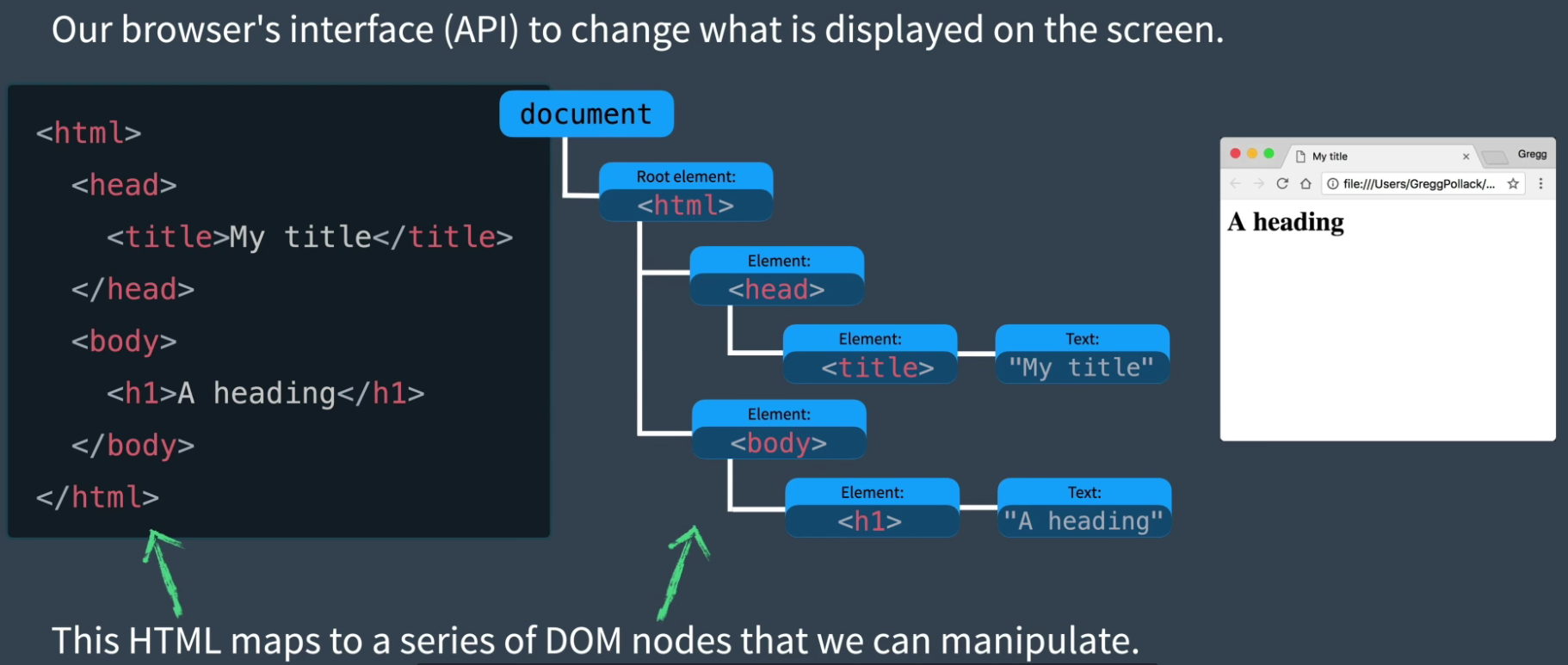
html映射成一个个DOM节点,为了与DOM交互,我们可以编写javascript
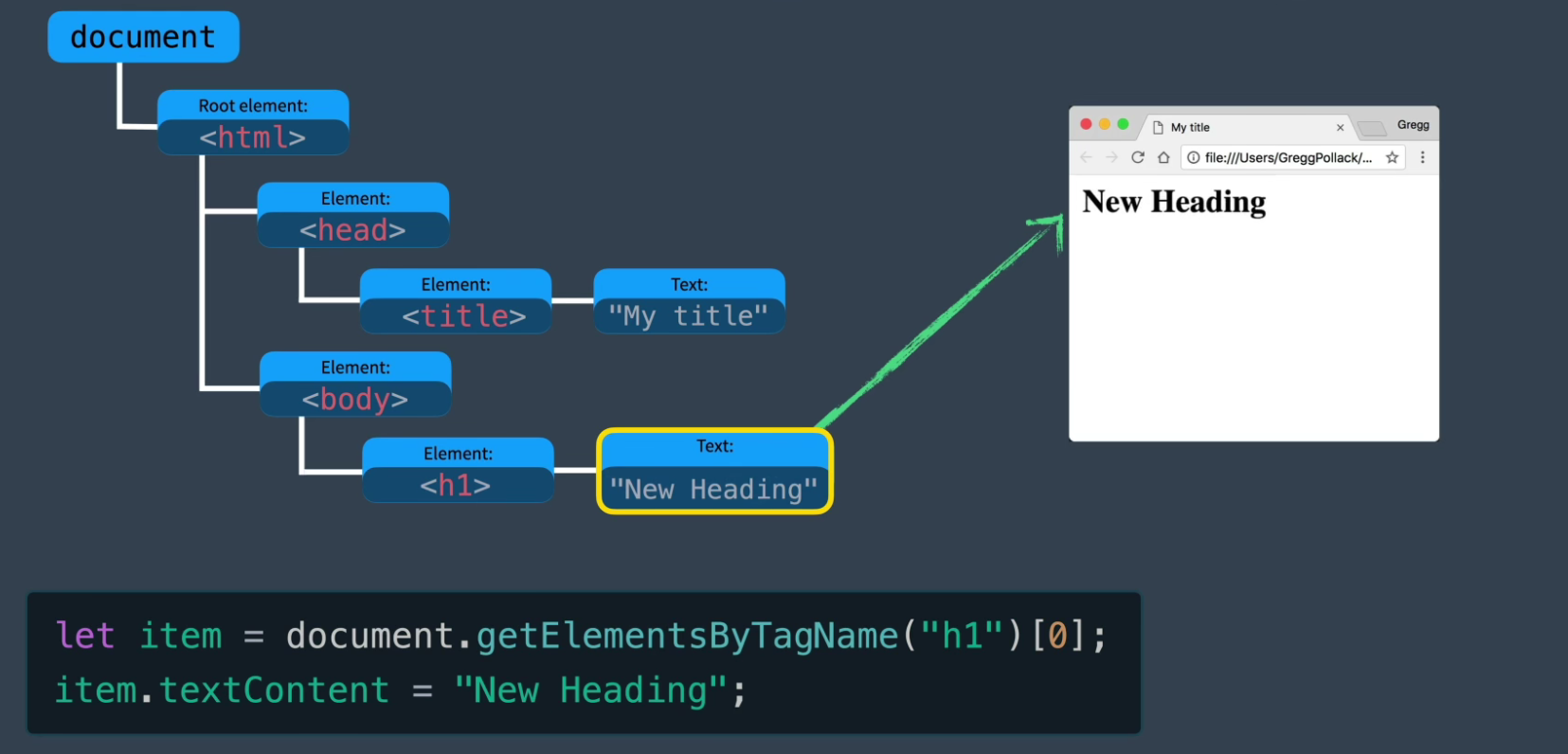
但一个网页上有成千上万个dom节点,如果我们都要一个个去获取操作,那会很麻烦。
这就是vue这些框架诞生的意义,让它去帮助我们干这些重活,并进行大量javascript调用。
但如果搜索和更新需要遍历整个DOM树会让工作量变得很大,效率也会很慢,所以这就是vue和其他类似框架应用虚拟DOM的原因。
Virtual DOM是用javascript对象表示DOM的一种形式,虚拟dom是由vue中的渲染函数生成返回的。
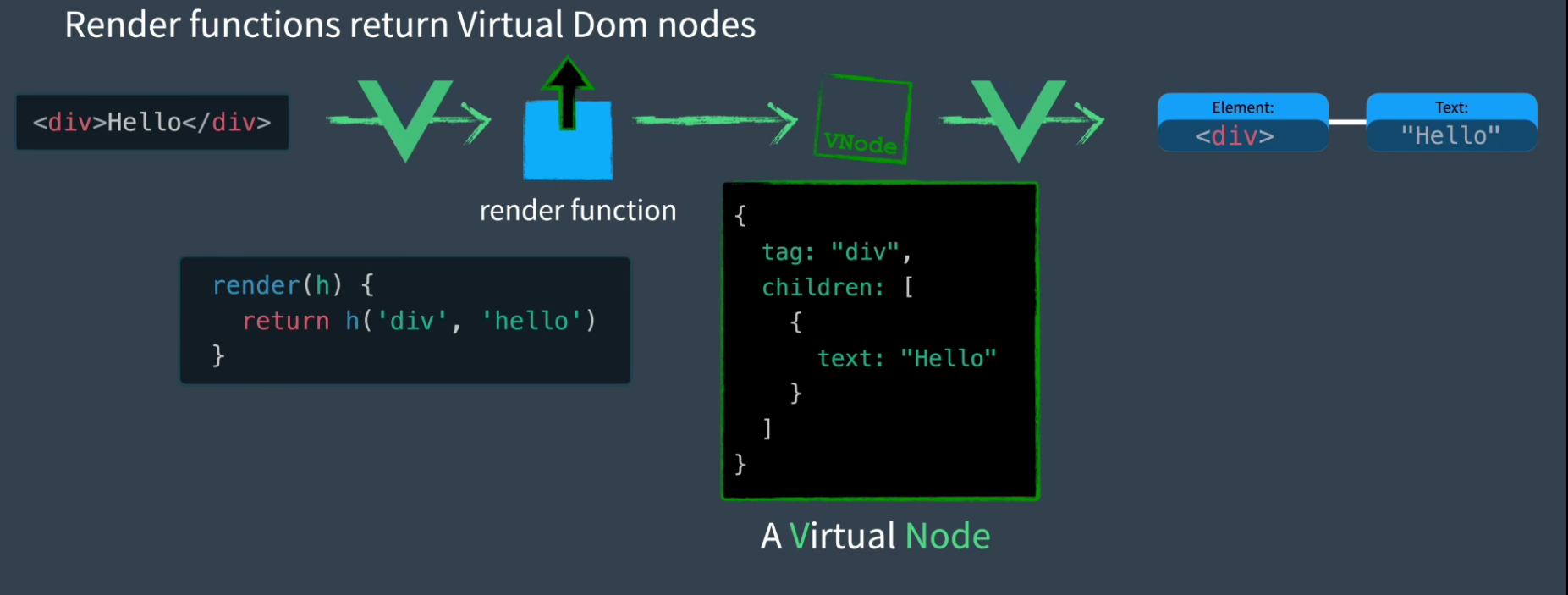
当组件发生改变时,Render函数将从新运行,生成一个新的虚拟dom与旧的虚拟dom发送到vue中进行比对,以最高效的形式在网页上进行更新

vue的三大模块
响应式模块、编译器模块和渲染模块是vue的核心三大模块
响应式模块
我们之前学习了vue的响应式原理,大概总结就是:该模块允许我们创建javascript响应对象,并可以观察其变化,当使用这些对象的代码运行时,它们会被跟踪。当响应对象变化时,它们可以做出相应改变。
编译器模块
它知道如何获取HTML模板,并将他们编译成渲染函数,浏览器可以只接收渲染函数。
渲染模块
渲染模块包含在网页上渲染组件的三个不同阶段,分别为渲染阶段、挂载阶段、补丁阶段。

渲染阶段
该阶段负责通过渲染函数生成虚拟dom节点
挂载阶段
该阶段负责将虚拟dom通过调用DOM API创建网页
补丁阶段
该阶段渲染器负责将新旧虚拟DOM进行比对,并只更新网页变化的部分
小运行流程
假设现在某个组件内有一个模板,以及在模板内部使用的响应式对象。
- 首先,编译器模块的模板编译器将
html模板转换为一个render函数 - 然后使用响应式模块初始化响应式对象
- 接下来进入渲染阶段,在渲染模块中调用
render函数,函数引用了响应对象,这个对象被监视跟踪。render函数返回一个虚拟DOM节点。 - 在挂载阶段,调用
mount函数使用 虚拟dom节点创建web页面。 - 之后,如果响应对象发生变化,由于它被监视跟踪,所以渲染器会再次调用
render函数创建一个新的虚拟dom节点 - 渲染器将新旧节点发到
patch函数中进行比对,然后只更新改变的部分
vue3 Template explorer
左边是HTML模板,右边是实时编译的render函数,右上方可提供多种选项的编译方式
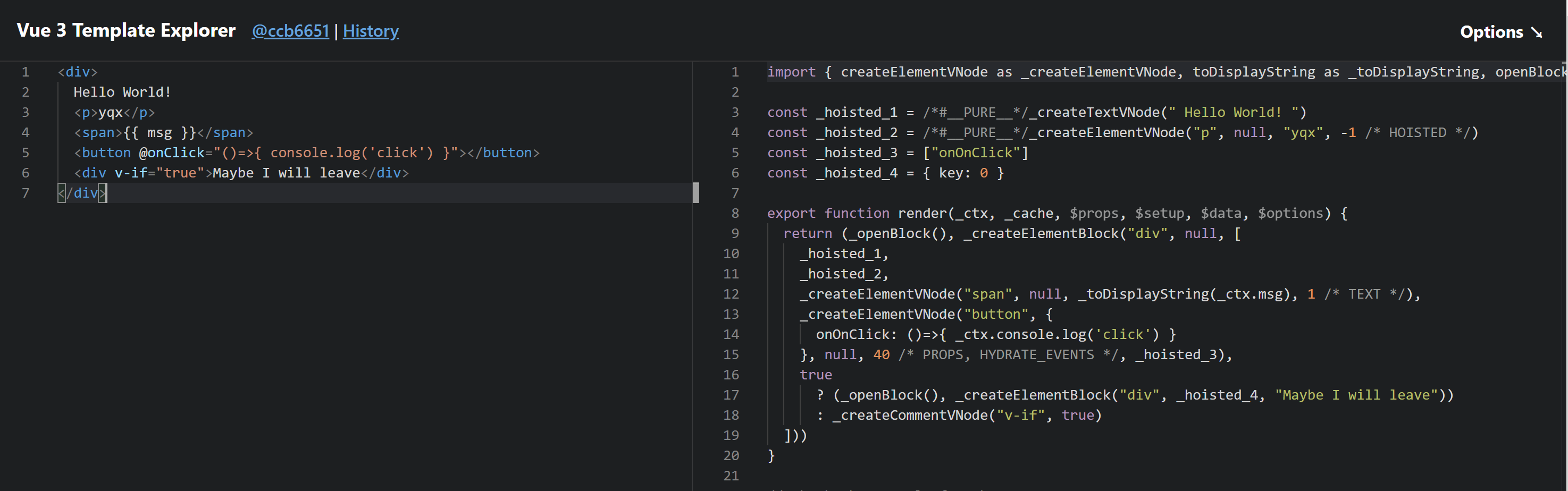
如果编译器没有提示,虚拟DOM渲染器只看到整个DOM树,并不知道哪部分会改变。
编译器的工作就是提供这些信息,让虚拟dom可以直接定位到正确的动态节点上。
编译器运用了块的思想,将模板的根变成一个块,注意右边的_openBlock函数,当这个块打开时,会检查其中的动态子节点,有/*Text*/类似标注的会被跟踪,并加入当前打开的block作为动态节点。
在整个渲染函数调用之后,根会有一个额外的属性称为动态子节点,其值只包含动态部分的节点
<div>
    <span>{{ msg }}</span>
</div> 上面的代码中,span就是div这个块的动态子节点
来个mini-vue
<style>
  .red {
    color: red;
  }
  .green {
    color: green;
  }
</style>
<div id="app"></div>
<script>
  // render function
  function h(tag, props, children) {
    // return vdom
    return {
      tag,
      props,
      children,
    };
  }

  function mount(vdom, container) {
    const el = document.createElement(vdom.tag);
    if (vdom.props) {
      for (const key in vdom.props) {
        if (key.startsWith("on")) {
          el.addEventListener(
            key.slice(2).toLocaleLowerCase(),
            vdom.props[key]
          );
        } else {
          el.setAttribute(key, vdom.props[key]);
        }
      }
    }
    if (vdom.children) {
      if (typeof vdom.children === "string") {
        el.textContent = vdom.children;
      } else {
        vdom.children.forEach((child) => {
          mount(child, el);
        });
      }
    }
    vdom.el = el;
    container.appendChild(el);
  }

  function patch(oldVdom, newVdom) {
    console.log(oldVdom, newVdom);
    if (oldVdom.tag === newVdom.tag) {
      const el = (newVdom.el = oldVdom.el);
      const oldProps = oldVdom.props || {};
      const newProps = newVdom.props || {};
      for (const key in newProps) {
        const oldValue = oldProps[key];
        const newValue = newProps[key];
        if (oldValue !== newValue) {
          el.setAttribute(key, newValue);
        }
      }
      for (const key in oldProps) {
        if (!(key in newProps)) {
          el.removeAttribute(key);
        }
      }
      const oldChildren = oldVdom.children;
      const newChildren = newVdom.children;
      if (typeof newChildren === "string") {
        if (typeof oldChildren === "string") {
          if (oldChildren !== newChildren) {
            el.textContent = newChildren;
          }
        } else {
          el.textContent = newChildren;
        }
      } else {
        if (typeof oldChildren === "string") {
          el.innerHTML = "";
          newChildren.forEach((child) => {
            mount(child, el);
          });
        } else {
          // 都是数组,源码中有使用key进行比较,现在假设没有key
          const commonLength = Math.min(oldChildren.length, newChildren.length);
          for (let i = 0; i < commonLength; i++) {
            patch(oldChildren[i], newChildren[i]);
          }
          if (newChildren.length > oldChildren.length) {
            newChildren.slice(oldChildren.length).forEach((child) => {
              mount(child, el);
            });
          } else if (newChildren.length < oldChildren.length) {
            oldChildren.slice(newChildren.length).forEach((child) => {
              el.removeChild(child.el);
            });
          }
        }
      }
    } else {
      // replace
    }
  }

  // reactivity
  const targetMap = new WeakMap();
  let activeEffect = null; // The active effect running

  let watchEffect = (eff) => {
    activeEffect = eff; // Set this as the activeEffect
    activeEffect(); // Run it
    activeEffect = null; // Unset it
  };

  function track(target, key) {
    if (activeEffect) {
      // Only track if there is an activeEffect
      let depsMap = targetMap.get(target);
      if (!depsMap) {
        targetMap.set(target, (depsMap = new Map()));
      }
      let dep = depsMap.get(key);
      if (!dep) {
        depsMap.set(key, (dep = new Set()));
      }
      dep.add(activeEffect);
    }
  }

  function trigger(target, key) {
    const depsMap = targetMap.get(target); // Does this object have any properties that have dependencies (effects)
    if (!depsMap) {
      return;
    }
    let dep = depsMap.get(key); // If there are dependencies (effects) associated with this
    if (dep) {
      dep.forEach((effect) => {
        // run them all
        effect();
      });
    }
  }

  function reactive(target) {
    const handler = {
      get(target, key, receiver) {
        let result = Reflect.get(target, key, receiver);
        track(target, key); // If this reactive property (target) is GET inside then track the effect to rerun on SET
        if (Object.prototype.toString.call(result) === "[object Object") {
          // 将嵌套对象包裹在自己的响应式代理中
          return reactive(result);
        } else {
          return result;
        }
      },
      set(target, key, value, receiver) {
        let oldValue = target[key];
        let result = Reflect.set(target, key, value, receiver);
        if (result && oldValue != value) {
          trigger(target, key); // If this reactive property (target) has effects to rerun on SET, trigger them.
        }
        return result;
      },
    };
    return new Proxy(target, handler);
  }

  const App = {
    data: reactive({
      count: 0,
    }),
    render() {
      return h(
        "div",
        {
          onClick: () => {
            this.data.count++;
            console.log("表哥,我出来了喔");
          },
        },
        String(this.data.count)
      );
    },
  };

  function mountApp(component, container) {
    let isMounted = false;
    let oldVdom;
    watchEffect(() => {
      if (!isMounted) {
        oldVdom = component.render();
        mount(oldVdom, container);
        isMounted = true;
      } else {
        const newVdom = component.render();
        patch(oldVdom, newVdom);
        oldVdom = newVdom;
      }
    });
  }

  mountApp(App, document.getElementById("app"));
</script>
哇哦,棒!但事实上,vue远没有这么简单,还有很多边界条件,包括diff算法比对等等,需要到源码里一探究竟。